Telemetry Server
Introduction
This document provides an overview of the Telemetry Server API routes, detailing the available endpoints, their functionalities, and how they facilitate communication between the telemetry node and the Groundstation. The Telemetry Server API is a critical component of the overall architecture, enabling efficient data exchange and management of boat operations. The server lives in its own repository at autoboat-vt/telemetry_server.
Diagram showing how each component interacts with each other
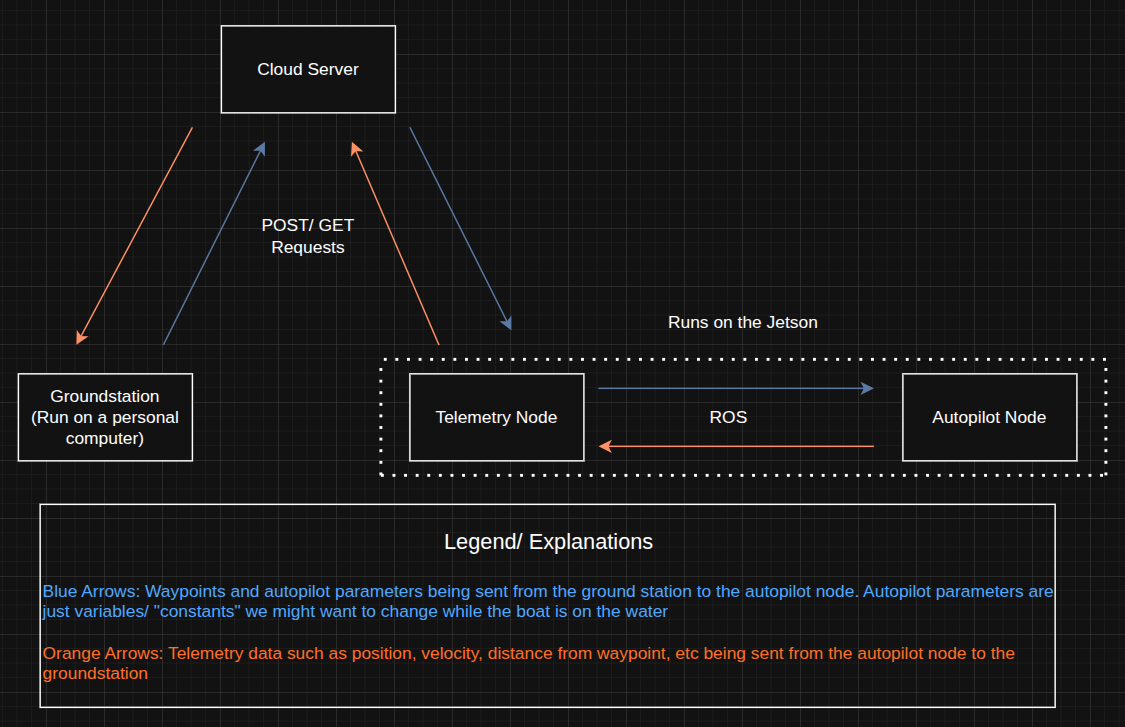
API Routes Overview
The Telemetry Server API is implemented using Python's Flask framework with Flask-SQLAlchemy as the ORM. The production stack runs as a Docker Compose cluster fronted by a Cloudflare Tunnel.
Production URL: https://vt-autoboat-telemetry.uk
Testing URL: https://test.vt-autoboat-telemetry.uk
The testing instance runs on port 6001 inside the container and the production instance runs on port 8000; both are Gunicorn apps. The Cloudflare tunnel routes the public hostnames to the right container, so no inbound ports need to be open on the host. The cron sidecar calls /instance_manager/clean_instances every 5 minutes to evict stale instances.
Deployment
| Service | Purpose |
|---|---|
telemetry-prod |
Gunicorn app on :8000 (production) |
telemetry-test |
Gunicorn app on :6001 (testing) |
cloudflared |
Outbound tunnel to Cloudflare; routes hostnames to containers |
cron |
Calls /instance_manager/clean_instances every 5 min |
tailscale |
Optional (--profile tailscale). SSH access from your tailnet. |
Multi-arch images (linux/amd64 + linux/arm64) are published on every push to main to both GHCR (ghcr.io/autoboat-vt/telemetry_server:latest) and Docker Hub (docker.io/vtautoboat/telemetry_server:latest). See the telemetry_server README for full deploy instructions. For local development without Docker: pip install -e . then flask run (or gunicorn "autoboat_telemetry_server:create_app()").
Routes
Autopilot Parameters Routes
| Method | Endpoint | Description |
|---|---|---|
GET |
/autopilot_parameters/test |
Test route for autopilot parameters. |
GET |
/autopilot_parameters/get/<int:instance_id> |
Get the current autopilot parameters for a specific instance. |
GET |
/autopilot_parameters/get_new/<int:instance_id> |
Get the latest autopilot parameters if they haven't been retrieved yet. |
GET |
/autopilot_parameters/get_default/<int:instance_id> |
Get the default autopilot parameters. |
GET |
/autopilot_parameters/get_hash/<int:instance_id> |
Get the hash of the current autopilot parameters for a specific instance. |
GET |
/autopilot_parameters/get_config/<config_hash> |
Get the autopilot configuration for a specific configuration hash. |
GET |
/autopilot_parameters/get_hash_description/<config_hash> |
Get the description for a specific configuration hash. |
GET |
/autopilot_parameters/get_all_hashes |
Get all stored autopilot configuration hashes. |
GET |
/autopilot_parameters/get_hash_exists/<config_hash> |
Check if a specific configuration hash exists. |
POST |
/autopilot_parameters/set/<int:instance_id> |
Set the autopilot parameters using the request data. |
POST |
/autopilot_parameters/update_existing_parameter/<int:instance_id>/<parameter_key> |
Update a single existing autopilot parameter by key. |
POST |
/autopilot_parameters/set_default/<int:instance_id> |
Set the default autopilot parameters using the request data. |
POST |
/autopilot_parameters/set_hash_description/<config_hash>/<description> |
Set the description for a specific configuration hash. |
POST |
/autopilot_parameters/set_default_from_hash/<int:instance_id>/<config_hash> |
Set the default autopilot parameters using a stored configuration hash. |
POST |
/autopilot_parameters/create_config |
Create a new autopilot configuration from the request data. |
DELETE |
/autopilot_parameters/delete_config/<config_hash> |
Delete a stored autopilot configuration hash. |
Boat Status Routes
| Method | Endpoint | Description |
|---|---|---|
GET |
/boat_status/test |
Test route for boat status. |
GET |
/boat_status/get/<int:instance_id> |
Get the current boat status for a specific instance. |
GET |
/boat_status/get_new/<int:instance_id> |
Get the latest boat status if it hasn't been retrieved yet. |
POST |
/boat_status/set/<int:instance_id> |
Set the boat status using the request data. |
POST |
/boat_status/set_fast/<int:instance_id> |
Set the boat status using a list of values corresponding to the boat status mapping. |
POST |
/boat_status/set_mapping/<int:instance_id> |
Set the boat status mapping for an instance. |
Waypoint Routes
| Method | Endpoint | Description |
|---|---|---|
GET |
/waypoints/test |
Test route for waypoints. |
GET |
/waypoints/get/<int:instance_id> |
Get the current waypoints for a specific instance. |
GET |
/waypoints/get_new/<int:instance_id> |
Get the latest waypoints if they haven't been retrieved yet. |
POST |
/waypoints/set/<int:instance_id> |
Set the waypoints using the request data. |
Image Manager Routes
| Method | Endpoint | Description |
|---|---|---|
GET |
/image_manager/test |
Test route for image management. |
GET |
/image_manager/get/<image_uuid> |
Get the raw image bytes for a UUID. |
GET |
/image_manager/get_info/<image_uuid> |
Get metadata for a UUID (no binary payload). |
GET |
/image_manager/get_all |
Get metadata for all images (no binary payload). |
POST |
/image_manager/upload |
Upload an image. |
DELETE |
/image_manager/delete/<image_uuid> |
Delete an image by its UUID. |
DELETE |
/image_manager/delete_all |
Delete all images. |
Instance Manager Routes
| Method | Endpoint | Description |
|---|---|---|
GET |
/instance_manager/test |
Test route for instance management. |
GET |
/instance_manager/create |
Create a new telemetry instance. |
GET |
/instance_manager/get_user/<int:instance_id> |
Get the user of a telemetry instance. |
GET |
/instance_manager/get_name/<int:instance_id> |
Get the name of a telemetry instance. |
GET |
/instance_manager/get_id/<instance_name> |
Get the ID of a telemetry instance by its name. |
GET |
/instance_manager/get_instance_info/<int:instance_id> |
Get detailed information about a specific telemetry instance. |
GET |
/instance_manager/get_all_instance_info |
Get detailed information about all telemetry instances. |
GET |
/instance_manager/get_ids |
Return all telemetry instance IDs. |
GET |
/instance_manager/get_diagnostic_message/<int:instance_id> |
Get the diagnostic message for a telemetry instance. |
POST |
/instance_manager/set_name/<int:instance_id>/<instance_name> |
Set the name of a telemetry instance. |
POST |
/instance_manager/set_user/<int:instance_id>/<user_name> |
Set the user for a telemetry instance. |
POST |
/instance_manager/set_diagnostic_message/<int:instance_id> |
Set the diagnostic message for a telemetry instance. |
DELETE |
/instance_manager/delete/<int:instance_id> |
Delete a telemetry instance by its ID. |
DELETE |
/instance_manager/delete_all |
Delete all telemetry instances. |
DELETE |
/instance_manager/clean_instances |
Remove all telemetry instances not marked for keeping. |